





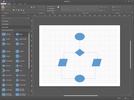
MetaLogic Diagram Designer is a light software with a simple UI. By using this powerful product, you can design diagrams, organizational graphs and any abstract visual in your mind. It also has simple and useful tools for creating geometric shapes to use in your graphs without any limit.
MetaLogic Diagram Designer, a software for all!
Considering its simple UI, this flowchart maker can be useful for any user regardless of their computer knowledge, even those with no software experience can use it for diagram design, vector graphs, flowcharts and charts.
What do you know about diagram designer's structure?
The good news for those users who want to create and design diagrams and flowcharts is that this has the simplest UI among other online and offline creative diagram design software. This product has quick installation and you can start your projects. These projects are saved in XML format and can be re-read anytime within the app and can be exported in any format you prefer.
MetaLogic Diagram Designer, light and powerful in designing diagram and flowchart
Small size and plentiful features are other advantages of this app. After running diagram designer, you can create any kind of diagram and flowchart you want. If you are a manager tending to make organizational diagrams, we recommend using this app since it doesn’t require professional computer knowledge and economizes your resources by dispensing you from assigning this task to your employees.
Functional features of MetaLogic Diagram Designer in creating diagram and flowchart
UI/UX of diagram designer is similar to Microsoft Word but there isn’t any complicated list of menus, you can see an optimized UI with compact and practical menus for picking shaped and getting started with your preferred diagram. Creating visual graphics and charts has always been an important part of student projects. Without the troubles of online limited options, you can do whatever that is in your mind with a few clicks.
MetaLogic Diagram Designer supports official international fonts
Diagram Designer is one of the famous and popular programs among professional essayists and freelancers. If you are a freelancer or essayists that uses chart you already know that not all the apps have a good support of Googles’ official fonts. But by using diagram designer, any professional essayist can use different options of local and international fonts for creating flowcharts.
MetaLogic Diagram Designer, the best software for creating diagrams and flowcharts
Huge features and its low size on disk can satisfy any windows user that looks for a compact and functional without limitations of other online programs. By using its internal converter, you can export your final project in any desired format like pdf, png, gif, jpeg and etc. Diagram Designer can help you perform accurately and smart through your projects.
What are the strengths of MetaLogic Diagram Designer?
1)Simple UI
2)Ability to design any diagram and apply any abstract idea with powerful tools
3)Needless of technical knowledge
4)Accurate layout tools for diagrams
5)Saving project to any desired format
6)Functional shortcuts for creating diagrams and flowcharts
7)Lower price in comparison with other diagram program providers
8)Able to support advanced design process and use of graphical elements
9)Without any limitation seen in other online diagram and flowchart programs
10)Supporting features of local and international fonts
11)Easy installation
12)Small size and huge features



















Comments
There are no opinions about MetaLogic Diagram Designer yet. Be the first! Comment